

Greenhouse lighting troubleshooting starts by confirming the symptom, checking the measurement, and identifying whether the problem affects one fixture, one zone or the whole site. Compare actual light with commands, schedules and available power records. Change one variable at a time, preserve event logs, and refer electrical defects or internal repairs to qualified service personnel.
Greenhouse lighting troubleshooting is easier when observations are separated from explanations. “Zone B measured less light at 13:00” is evidence. “All its LEDs are worn out” is a hypothesis. Establish what changed, where it changed and under which operating conditions before replacing equipment or increasing runtime.
This guide covers operational diagnosis of installed greenhouse lighting. For interface design, use the 0–10 V and zone-control guide. The following sequence is a MarsEVOL engineering method; all numeric examples are synthetic and do not describe a product fault rate, control specification or customer project.
Key Takeaways
- Verify the sensor and comparison conditions before treating low PPFD as a fixture fault.
- Use the affected area and event timing to narrow the investigation.
- Record command, measured output and actual power separately where data are available.
- Close the case with a repeat test and restored operating settings.
Where should greenhouse lighting troubleshooting begin?
Begin with a safe, timestamped description of the problem and a known comparison state. Record the zone, fixture IDs, crop plane, schedule, dimming command, sensor reading and first observed time. Ask whether the symptom began after cleaning, irrigation, a software update, a replacement or a layout change.
1. Separate urgent defects from performance questions
Visible cable damage, water inside an enclosure, burning odor or repeated protective-device operation requires isolation and qualified investigation through the site’s procedure. Do not repeatedly reset a trip, bypass protection or open a live driver to continue production. Use an approved contingency plan for the affected crop zone.
For U.S. workplaces, OSHA’s electrical work-practice requirements address deenergization and lockout and reserve work on exposed energized equipment for qualified persons.[1] A software off command is not electrical isolation. Keep the grower’s observation tasks separate from electrical testing and repair.
For a stable light-level discrepancy without those warning signs, gather non-invasive evidence first. Preserve the current settings and event log before restarting the controller. A restart can clear useful evidence or temporarily hide an intermittent problem.
2. Define what “low light” means
Compare like with like: electric-only output with electric-only output, the same sensor plane with the same plane, and the same operating command with the same command. A cloudy-day reading below yesterday’s sunny reading does not demonstrate a failed fixture.
Check whether the complaint concerns instantaneous PPFD, accumulated DLI, uniformity, flicker, failure to turn off or a completely dark zone. The PPFD versus DLI guide helps identify the relevant metric. A low daily total can result from lost operating hours even when instantaneous output is normal.
How do you rule out a measurement problem?
Inspect the complete sensor-to-display chain and compare it with an independent instrument under matched conditions. Start with surface cleanliness, leveling, shading, measurement height and the exact sensor type; then review scaling, units, time stamps and data gaps.
3. Check placement and data conversion
Apogee’s SQ-500 documentation describes an analog signal proportional to PPFD and provides the model’s measurement and troubleshooting procedures.[2] Follow the calibration certificate and correct logger interface for the installed sensor. A multiplier for a millivolt-output model cannot simply be copied to a different output type.
Review the PAR sensor placement guide when the fixed sensor disagrees with crop observations. A newly grown leaf, relocated pipe or changed screen can alter its view. For a comparison, place the reference instrument at the same height and orientation without shading either sensor, then repeat under stable light.
Do not use a lux-to-PPFD estimate as the deciding reference when spectrum is uncertain. Check whether one instrument includes far-red while the other measures conventional 400–700 nm PPFD. Different spectral bands are not interchangeable readings, even when both displays use photon units.
Worked example: an incorrect logger multiplier
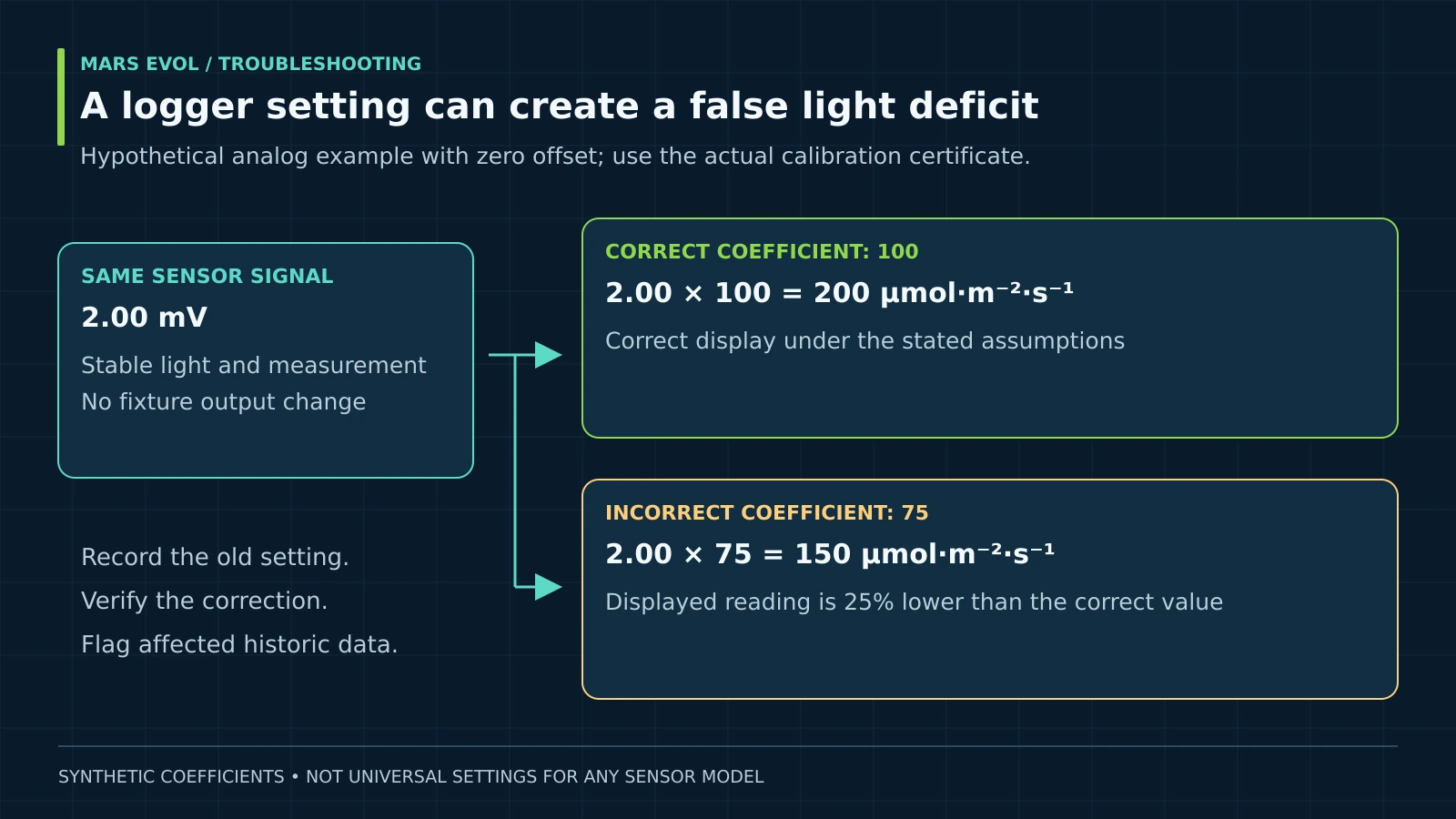
Assume a hypothetical analog sensor produces 2.00 mV at a stable test condition. Its calibration coefficient is 100 μmol·m⁻²·s⁻¹ per mV, with zero offset for this example. A logger incorrectly configured with a coefficient of 75 displays a lower result despite unchanged illumination.
Correct PPFD = 2.00 × 100 = 200 μmol·m⁻²·s⁻¹
Displayed PPFD = 2.00 × 75 = 150 μmol·m⁻²·s⁻¹
Reading error = (150 − 200) ÷ 200 × 100 = −25%
Use the actual certificate, units and any required offset; these are not universal sensor settings.
A sensor-scaling error can also affect control decisions. If a controller interprets the light level as too low, its configured logic may request more lighting. Correct the approved calibration settings, retain the previous value in the change record, and verify the resulting readings and controller behavior.
Never relabel historical data silently. Mark the period affected by incorrect scaling, explain any documented recalculation, and keep the original series. If raw data are missing, the true historic exposure may remain uncertain.
Greenhouse lighting troubleshooting by fixture, zone and site
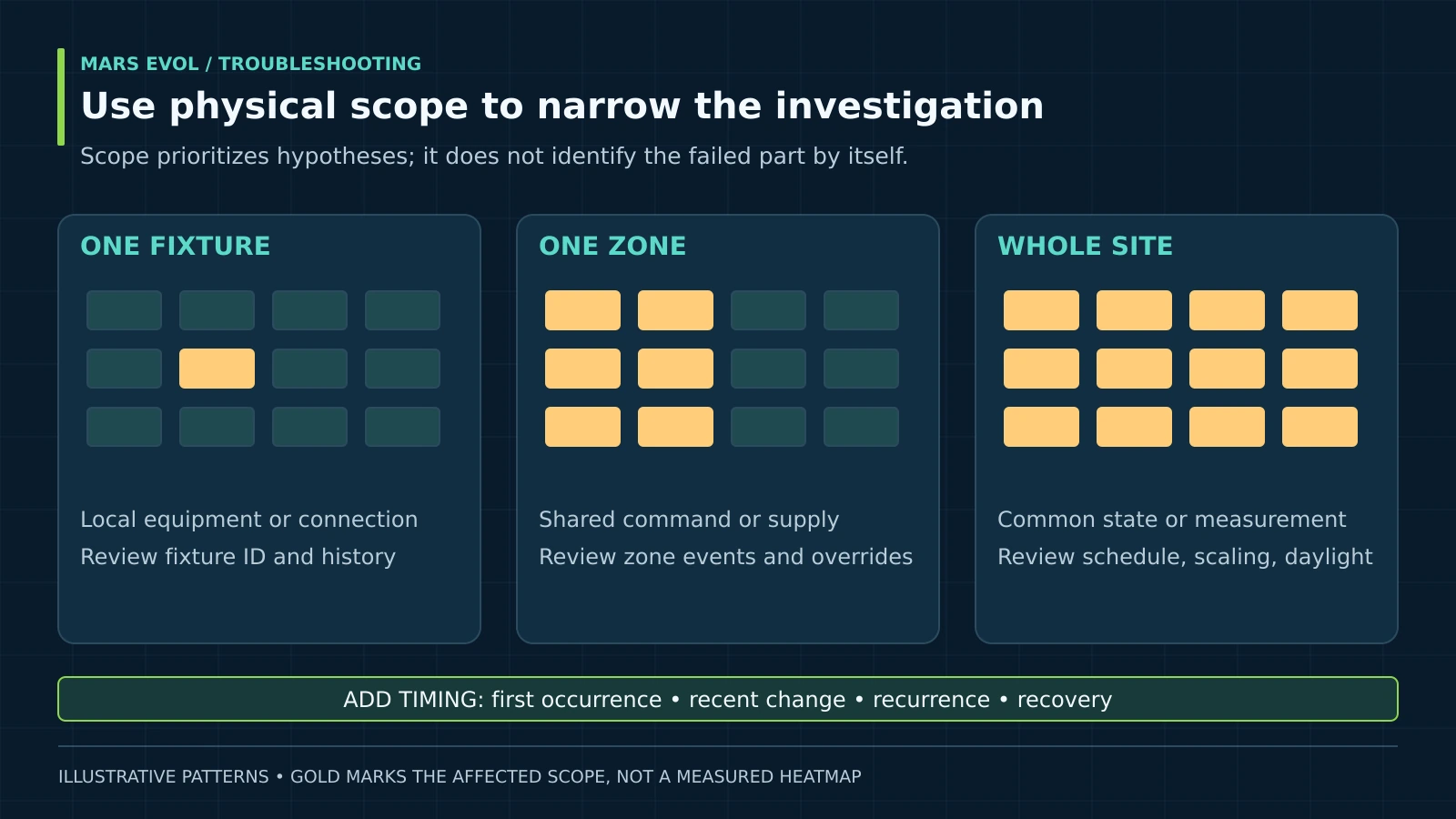
The spatial pattern helps prioritize hypotheses, but it does not establish the failed component by itself. Compare a suspect area with a nearby area that shares relevant conditions and has a reliable baseline.
| Observed scope | First records to compare | Possible investigation |
|---|---|---|
| One fixture dark or unstable | Fixture ID, command, installation and service history | Local equipment or connection; qualified inspection |
| One entire zone changes together | Zone command, override, communication and circuit records | Shared controller, supply or configuration boundary |
| All zones report low light | Daylight, sensor scale, site schedule and software changes | Common measurement or operating-state issue |
| Edges are weak but center is stable | Same-coordinate map, mounting and obstructions | Distribution or geometry change |
| Daily total is low; spot PPFD normal | Operating hours, data coverage and time zone | Schedule gaps, interruptions or missing integration data |
Check physical labels against controller zone names. A software label can remain unchanged after fixtures have been reassigned. Use an approved observation test to confirm which fixtures respond to a zone command, and restore the normal schedule afterward.
For a distribution complaint, repeat the documented PPFD survey. A dark fixture may create a local deficit that is much larger than its share of total installed watts. Without a distribution model or measurements, do not calculate the worst crop-level loss by simply dividing failed fixture count by total count.
How do you investigate controls and changing output?
Compare the requested state with the observed response, then examine the conditions under which they diverge. Greenhouse lighting troubleshooting should preserve these separate records instead of assuming that a controller display proves actual output.
4. Check schedules, overrides and off behavior
Verify the controller clock, time zone, seasonal schedule, daily light target, maximum runtime and active manual overrides. Check whether a controller restarted with different defaults or whether a remote command changed the operating state. Review the logic in the DLI lighting control guide before changing the setpoints.
Lutron’s 0–10 V application note describes implementation differences, including minimum-level behavior and system limits.[3] A driver that remains at a low output may be behaving according to its specification. Compare its required off method with the installed sequence before declaring a failure.
Do not assume 50% command produces 50% PPFD or power. Use the accepted operating curve where available, then verify whether today’s response differs. Electrical interface measurements, polarity checks and wiring changes belong to qualified personnel using the equipment documentation.
5. Investigate intermittent and temperature-linked symptoms
Correlate event timing with ambient conditions, operating duration, irrigation, control changes and available power data. The DOE luminaire lifetime guide discusses multiple system failure mechanisms, including drivers and thermal or environmental stresses.[4] That evidence supports a broad investigation; it does not diagnose an individual greenhouse fixture.
Consider a synthetic fixed-state test log: all three observations use the same 100% command and measurement geometry, with daylight negligible or appropriately excluded. The readings below represent separate controlled observations, not a typical daylight production trace.
| Observation | Ambient condition | PPFD, μmol·m⁻²·s⁻¹ | Real input power |
|---|---|---|---|
| A | 20°C | 200 | 10 kW |
| B | 35°C | 160 | 8 kW |
| C | 23°C | 200 | 10 kW |
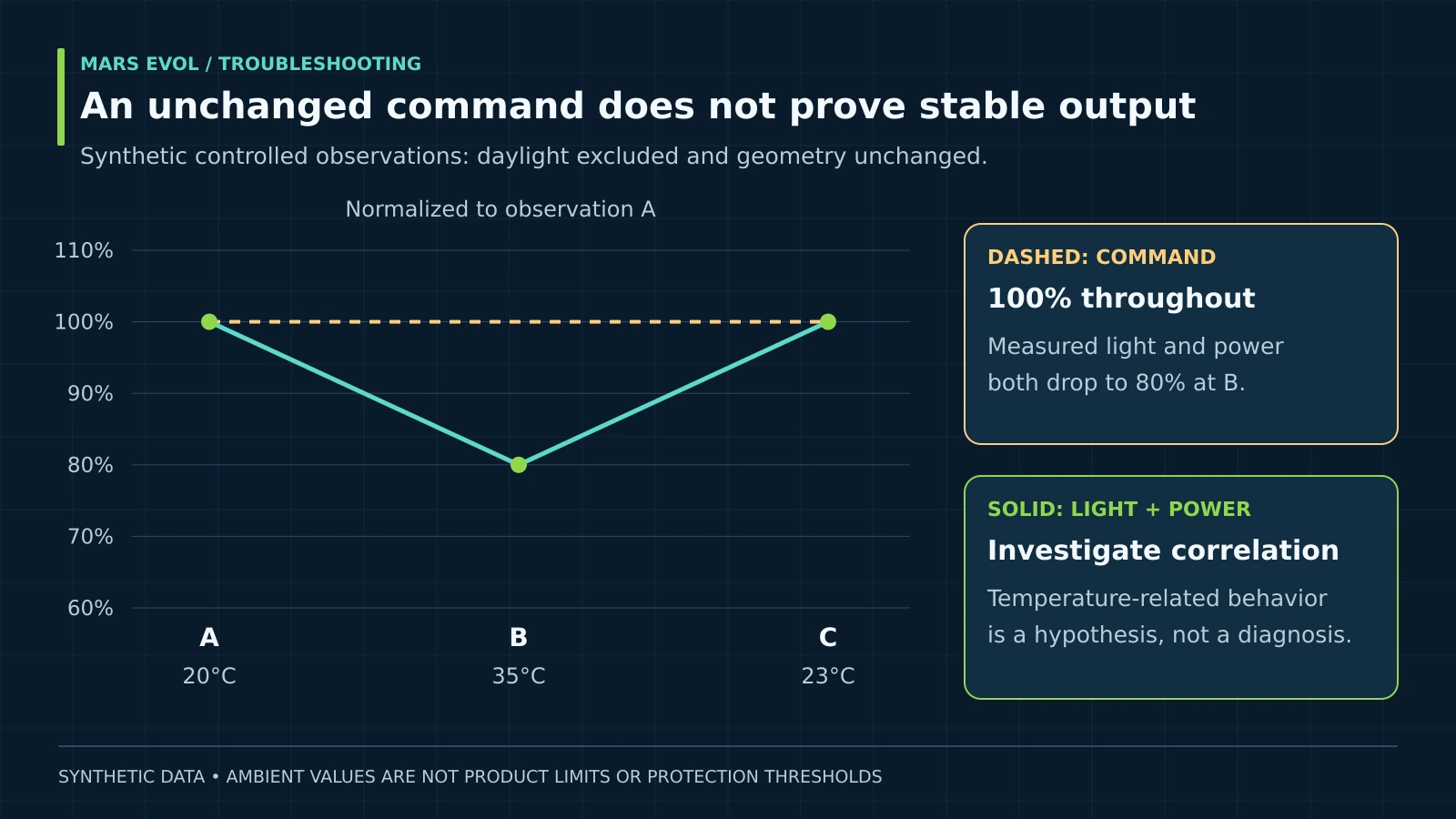
Light and power both fall to 80% of observation A in the warmer condition, then recover. This pattern makes temperature-related behavior worth investigating, but it does not prove thermal protection caused it. The temperatures are illustrative, not product limits. Check equipment logs, permitted ambient range, actual driver conditions and supply behavior through qualified service.
For flicker complaints, record the command and operating condition. A phone camera can show bands because of its own sampling and exposure; the video alone cannot quantify modulation or certify a driver fault. DOE’s flicker research discusses the role of driver and dimming behavior.[5] Use appropriate measurement equipment when the waveform itself matters.
How should greenhouse lighting troubleshooting be closed?
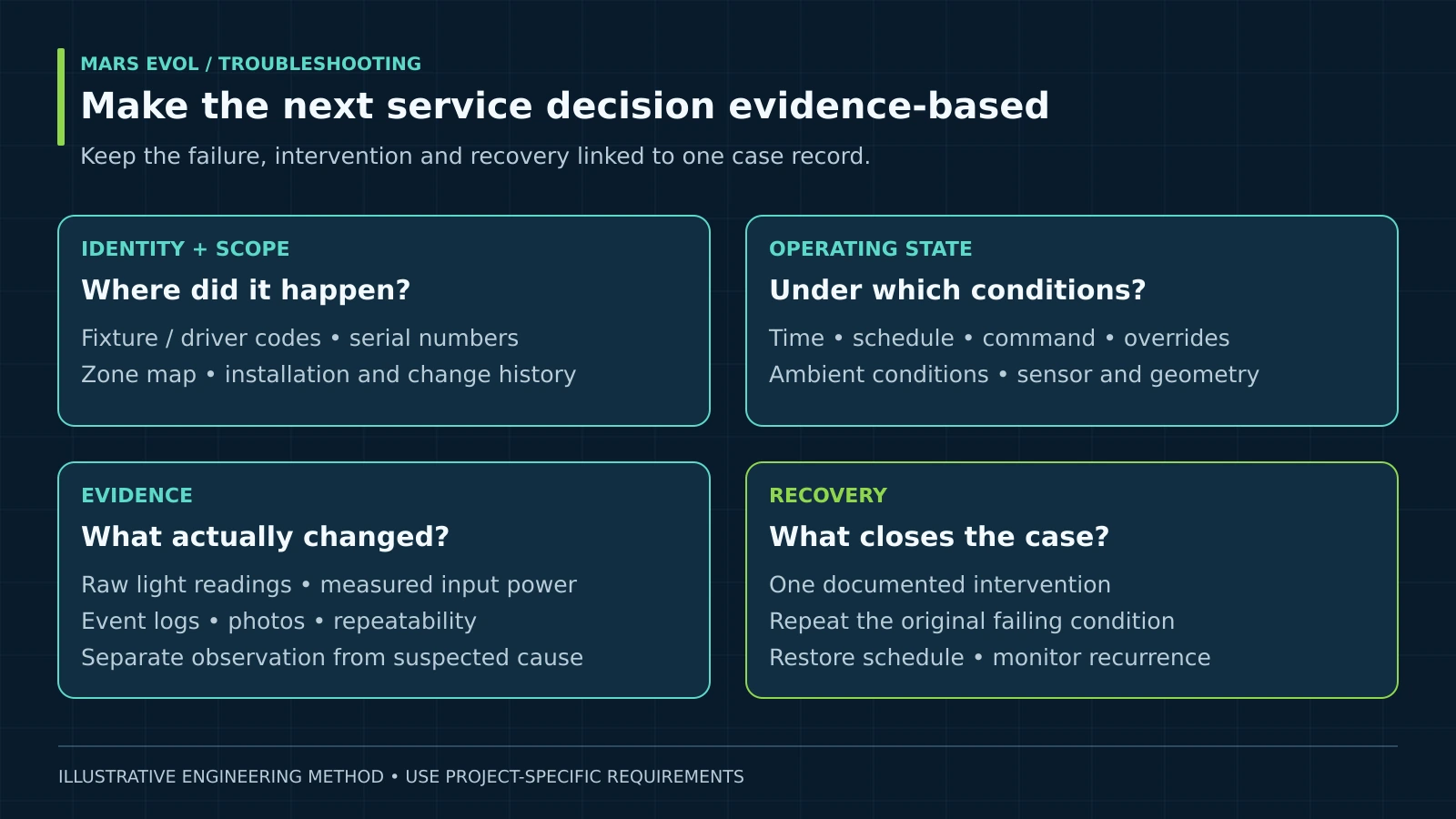
Repeat the original failing condition, confirm the neighboring functions still work, and restore the agreed operating configuration. A single normal reading after a restart is insufficient evidence that an intermittent fault is resolved.
6. Change one variable and document the result
Record the hypothesis, authorized intervention and expected observation. After a calibration correction, repeat the instrument comparison. After a fixture replacement, repeat the affected map and control states. After a schedule correction, review a complete representative operating cycle.
Retain the replaced model information and verify compatibility of spectrum, distribution, input rating, dimming and mounting. Use the electrical design guide when the investigation affects installation assumptions. Avoid increasing output elsewhere simply to conceal an unresolved local defect.
7. Send a service record that supports a decision
Provide fixture and driver codes, serial numbers, zone map, installation date, photos, firmware version, timestamps, settings and the measurement method. Include the failing and normal readings, actual interventions and remaining uncertainty. Distinguish measured power from nominal wattage or an estimated controller value.
Agree on the temporary operating arrangement with the crop manager. If light hours were lost, do not automatically add them overnight: the crop’s photoperiod and dark-period requirements still apply. Retain enough logs to assess recurrence after the equipment returns to service.
Common greenhouse lighting troubleshooting mistakes
- Replacing fixtures before checking the instrument: a scale or placement error can affect every displayed reading.
- Changing several settings together: this prevents attribution of the result to a particular action.
- Resetting before saving logs: intermittent faults may lose their most useful evidence.
- Declaring a cause from one correlation: scope and timing narrow the investigation but require confirming evidence.
Greenhouse lighting troubleshooting FAQ
Why are the lights on when the controller says off?
Check the intended off method, active overrides and zone assignment. Some dimming arrangements need a separate switching action. Have a qualified technician compare the installed sequence with the driver and controller documentation.
Can low DLI occur with normal fixture output?
Yes. Shortened runtime, cloudy conditions, shading or data gaps can reduce the recorded total. Review the daily timeline and valid data coverage before concluding that instantaneous output is low.
Does a dim zone mean the driver has failed?
No. Check command, schedule, measurement, shared supply and physical scope first. A driver fault is one possibility that needs supporting evidence.
Should a tripped breaker be repeatedly reset?
No. Repeated trips require qualified investigation and the site’s isolation procedure. Preserve event timing and affected equipment details for the electrician.
What should be checked after replacing one fixture?
Confirm model compatibility, local light distribution, dimming response, zone assignment and the restored schedule. Save the replacement date and serial number with the original installation record.
MarsEVOL Perspective
We recommend diagnosing the whole measurement-and-control chain before selecting a remedy. For SOLIFY PRO equipment, provide the exact ordering code and installed driver information when requesting support. This article does not assume the product reports diagnostic telemetry or includes any unverified protection feature.
Conclusion
Greenhouse lighting troubleshooting should end with a supported cause, a documented correction and evidence of recovery. The best starting point is a repeatable observation that separates the instrument, operating command, delivered light and installation conditions.
Prepare an evidence-based support request
Collect the fixture IDs, zone settings, timestamps, photographs and repeatable readings so the next investigation can address a defined problem.
Explore More MarsEVOL Resources
Check whether a daily-light shortfall follows a change in operating hours.
Strengthen measurement repeatability and the record of operating conditions.
References
- U.S. Occupational Safety and Health Administration. 29 CFR 1910.333: Selection and Use of Work Practices. Accessed September 25, 2026.
- Apogee Instruments. SQ-500 Quantum Sensor Owner’s Manual. Revision April 23, 2026.
- Lutron Electronics. 0–10 V Control Topology, Application Note 587. Accessed September 25, 2026.
- U.S. Department of Energy and Next Generation Lighting Industry Alliance. LED Luminaire Lifetime: Recommendations for Testing and Reporting. Third edition, September 2014.
- U.S. Department of Energy. Flicker Research. Accessed September 25, 2026.